MSP Sales Kit: Sell Productivity Monitoring as a Managed Service (MRR)
Copy/paste templates for IT providers: packaging, pricing math, proposal sections, kickoff agenda, monthly review report, and objection handling — focused on operational visibility (not micromanagement). No legal advice.
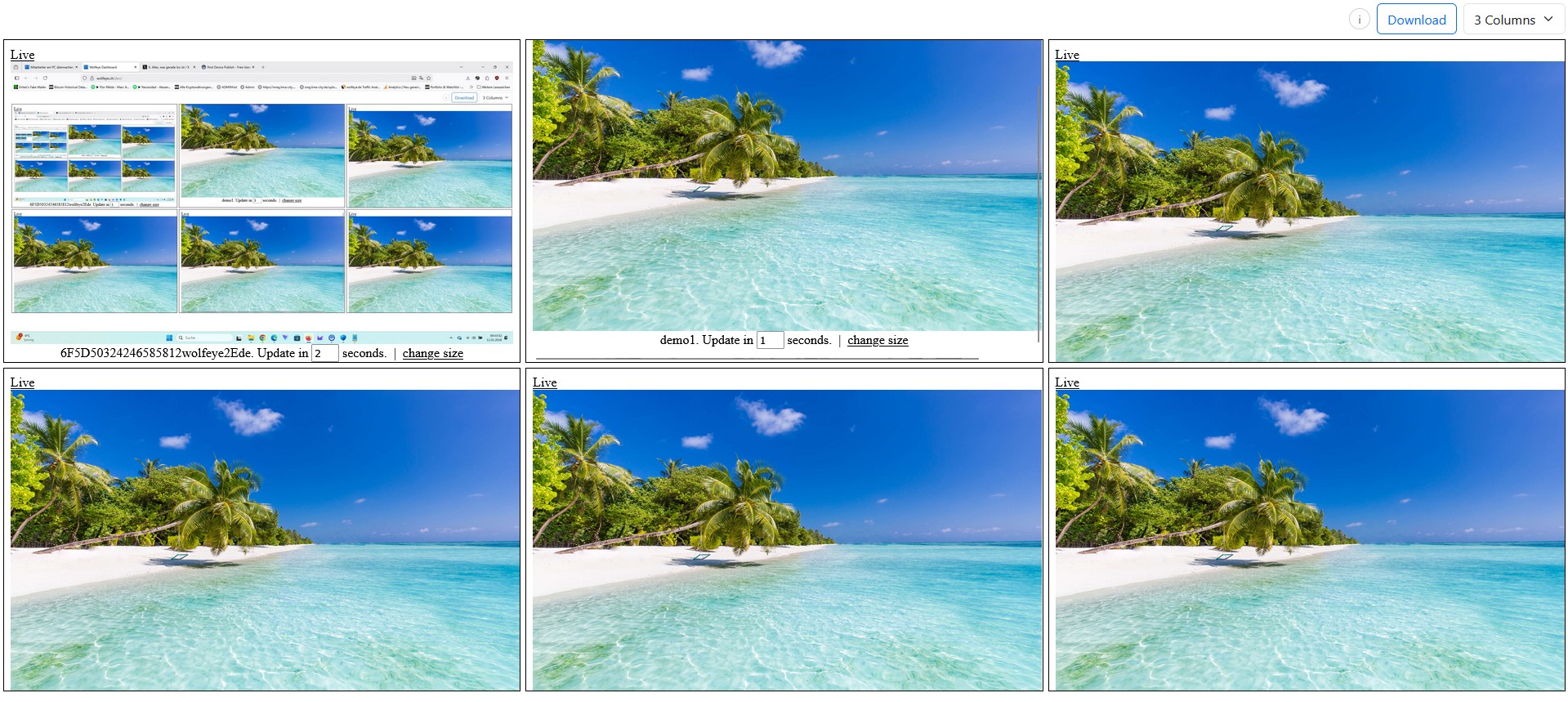
Illustrative image. Any real monitoring use must comply with applicable laws, contracts and internal policies.
In 2026, many MSPs feel the same pressure: clients want more outcomes (productivity, clarity, fewer support loops) — but budgets are tight and nobody wants another heavy “enterprise suite”.
One of the easiest add-on modules to sell is productivity visibility: a lightweight way for owners and supervisors to see what’s happening on company PCs (live grid → zoom into one screen) so they can improve onboarding, QA and support.
This post is a practical sales kit you can copy/paste into your own MSP process:
- a simple offer structure (pilot → rollout → managed),
- a pricing worksheet to turn per-PC costs into monthly MRR,
- a proposal template (scope, deliverables, responsibilities),
- a kickoff agenda + monthly review report structure,
- and objection handling that keeps it professional.
1) What SMB clients actually buy (and what they don’t)
If you sell “employee monitoring”, many owners hear risk and employees hear surveillance. If you sell productivity visibility, owners hear clarity and supervisors hear faster coaching.
What clients buy (practical outcomes)
- Onboarding speed: see where new hires get stuck, fix the workflow, reduce repeat questions.
- QA sampling: spot-check repetitive processes (CRM steps, ticket categorization, call center scripts).
- Support triage: resolve “I can’t see what you see” loops without interrupting work.
- Incident clarity (rare): when something looks wrong, quickly confirm what’s actually on the screen.
What clients do NOT want
- complex dashboards nobody uses after week 2,
- heavy recording that creates storage/bandwidth pain,
- a culture of constant watching.
Your positioning line: “This is not a micromanagement tool. It’s a visibility layer for training, QA and support — with clear boundaries.”
2) The workflow that sells: grid “radar” → zoom “detail”
The simplest story is also the strongest:
- Radar: a supervisor sees many screens side by side (grid) for fast pattern recognition.
- Zoom: if something looks off, they open one PC in a large view to understand the context.
- Action: coaching happens via normal channels (call/chat), not by taking control.
This is why lightweight live visibility often beats “analytics-first” products for SMB environments: it’s fast, visual, and supports real workflows.

Example: one browser dashboard showing multiple company PCs in a live grid view. Illustration only. Any real monitoring must comply with applicable laws and internal policies.
3) Offer structure that creates MRR (pilot → rollout → managed)
To make this predictable (and easy to sell), don’t pitch it as a one-off “install”. Pitch it as a module with a clear lifecycle:
Package A — Pilot (fixed fee)
- Scope: 10 PCs, 7–14 days
- Goal: prove performance + workflow value (onboarding, QA, triage)
- Deliverables: baseline check, naming standard, viewer roles, short success summary
Package B — Rollout (project)
- Scope: deploy to the agreed PC set (e.g., 25–200)
- Deliverables: repeatable installation method, grouping/naming, access control, supervisor onboarding
- Optional: screenshot history only if there’s a defined purpose + retention rule
Package C — Managed Visibility (monthly MRR)
- Monthly review call (30–45 min)
- Workflow tuning: reduce blockers, update SOPs, improve training
- Support triage help (when incidents happen)
- Quarterly “mini QBR”: outcomes, next actions, expansion opportunities
Why this wins: Clients don’t renew “software”. They renew outcomes + guidance.
4) Pricing worksheet (turn per-PC costs into monthly MRR)
Keep the math simple. You’re converting:
- Per-PC license cost (your cost basis),
- into client-facing monthly price (module fee),
- plus your managed service fee (the real MRR engine).
Step 1 — Convert license to “per month per PC”
Annual price ÷ 12 = monthly equivalent.
Step 2 — Decide your model
- Model 1 (cleanest): client pays the license (pass-through) + a monthly managed fee.
- Model 2 (bundle): one monthly price “Visibility Module” that includes license + service.
Copy/paste worksheet
PRICING WORKSHEET — VISIBILITY MODULE (MRR)

Inputs:
- Number of PCs: ______
- Your annual license cost per PC:
- Your monthly service fee (flat per client):
- Optional monthly fee per PC (management/insight):

Math:
1) License monthly equivalent = (annual license cost per PC) / 12
2) Monthly module price per PC = (license monthly equivalent) + (optional per-PC fee)
3) Total monthly module price = (monthly module price per PC * number of PCs) + (flat monthly service fee)

Example (fill your own numbers — illustration only):
- PCs: 40
- License cost: /PC/year → /PC/month
- Optional per-PC fee: /PC/month
- Flat service fee: /month
= Total monthly module: /month
Commercial disclaimer: all pricing/margin examples are illustrative only and not a guarantee of earnings. Your results depend on your market, pricing and delivery.

Example: one company PC in large live view (zoom-in). Use for purpose-driven checks (training/QA/support), not constant watching. Illustration only.
5) Proposal template (copy/paste) — keep it one page
In SMB sales, shorter wins. Below is a proposal structure you can paste into your own document. It’s designed to avoid “surveillance vibes” and focus on outcomes.
PROPOSAL — PRODUCTIVITY VISIBILITY MODULE (MANAGED SERVICE)

1) Objective (pick 1–2)
- Faster onboarding / training support
- QA sampling for repetitive workflows
- Faster IT support triage (“I can’t see what you see”)
- Rare: incident clarification when something looks wrong

2) What this is (simple explanation)
- Live screen visibility on company-controlled Windows PCs
- Supervisor workflow: overview grid (radar) → open one PC (zoom) when needed
- Not a remote-control tool (we do not take over PCs as part of this module)

3) Scope
- PCs included: ______
- Teams/sites included: ______
- Viewer roles (least privilege): ______

4) Deliverables
Pilot (7–14 days):
- Install on 10 PCs, confirm performance, set naming standard, define viewer access
Rollout:
- Deploy to agreed PCs, group devices, supervisor onboarding, access control
Managed (monthly):
- Monthly review call + action list
- Light support/triage when needed
- Optional: short “insight summary” (top blockers, training issues, process fixes)

5) Boundaries (anti-micromanagement)
- Purpose-driven checks only (training/QA/support)
- Defined viewers only (roles)
- Minimal retention by default; enable any history only with a purpose and rule

6) Responsibilities
Client:
- Provide list of PCs and supervisors
- Confirm internal policy/communication steps and legal requirements
MSP:
- Deploy, configure, restrict access, train supervisors, run monthly review

7) Timeline
- Pilot start date: ______
- Rollout date: ______
- First monthly review: ______

8) Pricing (fill in)
- Setup / pilot fee:
- Rollout fee:
- Monthly managed module: /month (+ optional /PC/month)
Note: include a one-line legal reminder in your proposal: “Client is responsible for lawful use; obtain legal advice where required.” Keep it short and non-technical.
6) Kickoff agenda + monthly review report structure
Retention comes from a simple rhythm. If you “install and disappear”, it becomes a commodity. If you run a 30-minute monthly review, it becomes a service.
Kickoff agenda (30 minutes)
- Confirm goals (pick 1–2 outcomes only)
- Define viewer roles + access boundaries
- Agree on naming standard (Department-PCName / Site-PCName)
- Decide if any history is needed (default: minimal/off)
- Success metrics for the pilot (fewer blockers, faster onboarding, fewer support loops)
Monthly review report (copy/paste outline)
MONTHLY VISIBILITY REVIEW — OUTLINE

A) Wins this month (2–3 bullets)
- Example: new hires completed onboarding faster
- Example: fewer “show me your screen” support calls

B) Top blockers observed (3–5 bullets)
- Tool/login loops, CRM lag, confusing workflow step, missing SOP

C) Process fixes recommended (action list)
- Update SOP, add training snippet, adjust permissions, simplify template

D) Adoption check
- Are checks purpose-driven?
- Are only approved viewers using access?
- Any signs of “watching too much”?

E) Next month focus (pick 1)
- Onboarding, QA sampling, support triage, incident readiness

F) Expansion opportunities (optional)
- Add team/site, add supervisors, integrate into onboarding pack
Why this works: SMB owners pay for clarity. Your monthly review turns visibility into action — and action into renewals.
7) Objection handling (copy/paste) — keep it calm
Objection: “Isn’t this spying?”
Answer: “We position this as training, QA and support visibility on company PCs — with boundaries. The goal is better processes, not constant watching. We also recommend clear internal communication and legal review based on your country.”
Objection: “Will this slow down PCs?”
Answer: “We run a 10-PC pilot first to verify CPU/RAM/network impact and dashboard usability before any rollout.”
Objection: “We already have time tracking.”
Answer: “Time tracking measures time. Visibility shows context for onboarding, QA and support. Many clients use both — but for different questions.”
Objection: “We don’t want heavy recording.”
Answer: “We default to live view and keep any retention minimal and purpose-driven. Heavy recording is rarely needed in SMB environments.”
8) Video: How IT Service Providers Can Generate New Monthly Recurring Revenue (MRR) with Productivity Monitoring
This video demonstrates the managed-service angle: how IT providers package live screen visibility as a simple module for SMB clients — focused on outcomes (onboarding, QA, support) instead of complexity.
Disclaimer: This video is for technical/operational illustration only and is not legal advice. Use monitoring software only if lawful in your country and for your specific use case. Where required, inform users and obtain consent. Always obtain independent legal advice before deployment.
Video: “How IT Service Providers Can Generate New Monthly Recurring Revenue (MRR) with Productivity Monitoring”.
FAQ – MSP Visibility Module (MRR)
Usually no. Position it as productivity visibility for onboarding, QA and support triage — with clear boundaries.
Not always. Many SMBs start with live view. If you enable any history, keep it purpose-driven with clear access and retention rules (and get legal advice).
Define boundaries: purpose-driven checks, limited viewer roles, minimal retention by default, and a monthly review focused on process improvements.
The monthly review rhythm, training/QA tuning, and continuous support value turn software into a managed module clients renew.
Conclusion
MSPs win when they productize outcomes.
If you package productivity monitoring as a visibility module (pilot → rollout → managed), you create a clean path to monthly recurring revenue — without adding a heavy analytics platform or building software yourself.
Keep it professional: focus on onboarding, QA and support workflows, enforce access boundaries, and run a monthly review that turns visibility into real process improvements.
Want to see the MSP workflow live (grid view → zoom view) in a demo?
Book Demo & Start Trial
Wolfeye is monitoring software. Any use must comply with the laws and regulations that apply in all relevant countries, your industry and your specific use case (for example, training supervision, quality assurance, or security). In many jurisdictions, permissibility depends on factors such as prior information of users, consent requirements, contractual terms, and internal policies. This article and the embedded video are for general technical/operational information only and do not constitute legal advice or a guarantee of legal admissibility.
Before using any monitoring software such as Wolfeye, obtain independent legal advice in all relevant countries about whether and how you may monitor company-controlled PCs (for example for training supervision, quality assurance or security), and under which conditions users must be informed or give consent.