Office & Home Office Company PCs: Hybrid Monitoring Rollout Checklist for SMBs & IT Providers
A practical technical playbook for hybrid teams: how to apply the same monitoring standard to company-controlled office PCs and home-office laptops — with clear scope, consistent naming, controlled access, and a clean pilot rollout. No legal advice.
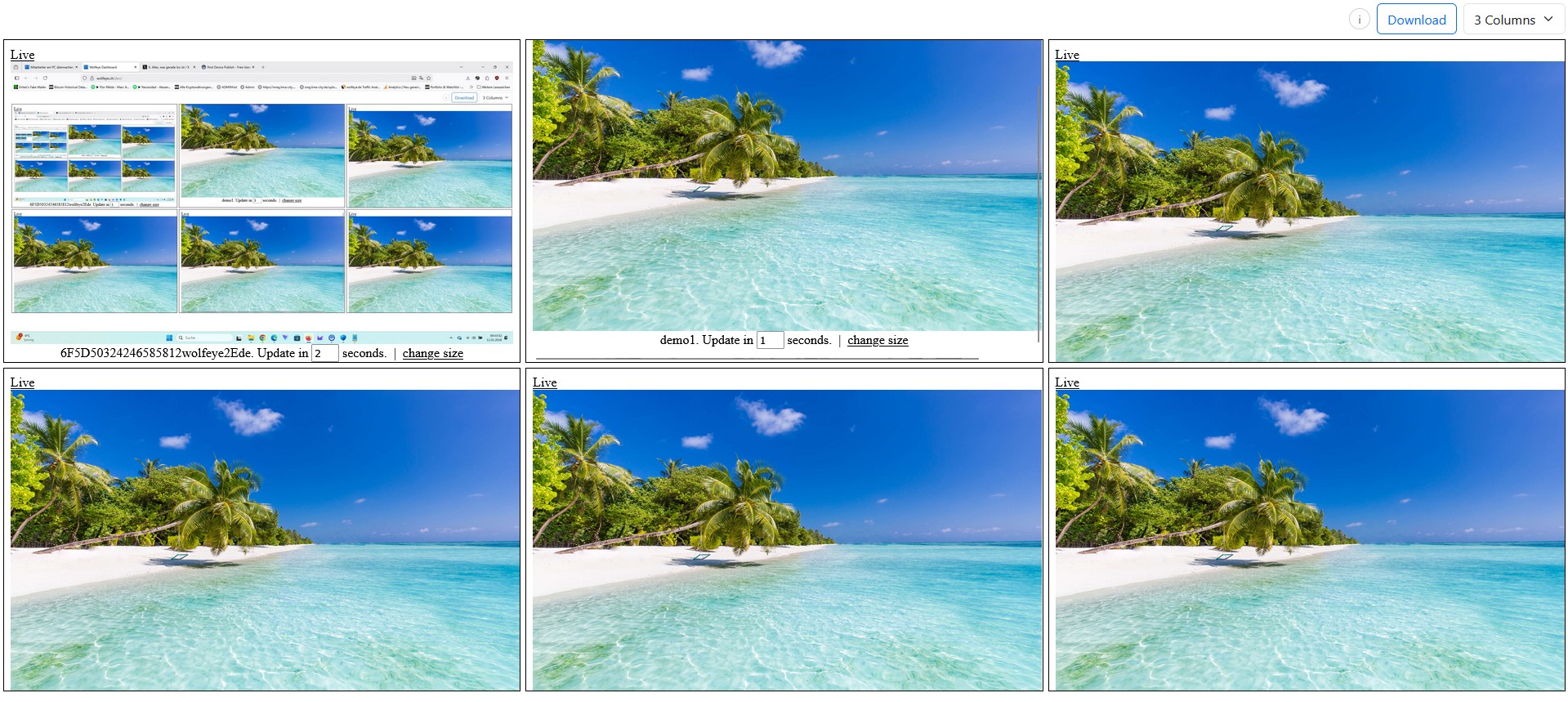
Illustrative hybrid live grid in Wolfeye Remote Screen. The goal of this article is technical standardisation across office PCs and home-office company laptops — not legal advice. Always obtain independent legal advice before deploying monitoring software.
Many SMB owners and IT service providers do not struggle with the question whether they can technically see company PCs live. The harder question is this: how do we apply the same operating standard to office PCs and home-office company laptops without creating a mess?
In practice, hybrid environments often drift apart very quickly. Office desktops may be installed by internal IT, while remote laptops are handled ad hoc. One team might appear in a clean dashboard naming structure, while another shows up with random device names. Some supervisors check only office screens, others only remote users. Access rights become inconsistent. Optional screenshot history is enabled for one subgroup but not another. The result is not clarity — it is friction.
That is why many SMBs and MSPs eventually need a hybrid monitoring rollout checklist. Not a vague discussion about hybrid work in general, but a concrete operational guide that answers practical questions such as:
- Which company-controlled PCs belong in scope — office desktops, home-office laptops, training devices, shared workstations?
- How should all monitored devices be named so the dashboard stays usable?
- Who is allowed to see live screens, and for which purpose?
- How do we avoid one rule for office staff and another for remote staff?
- What should a 5-PC or 10-PC pilot look like before the rollout grows?
Important: this article is not legal advice. Whether and how you may use monitoring software depends on the laws, regulations, contracts and internal policies that apply in the relevant country or countries, your industry, your specific purpose, and in many cases whether affected users must be informed or consent is required. Before using Wolfeye or any other monitoring software, always obtain independent legal advice in all relevant jurisdictions.
1. Why hybrid teams need one technical standard — not two separate worlds
When office and home-office company PCs are treated as two different environments, monitoring becomes harder than necessary. The software may still work technically, but the daily workflow becomes inconsistent:
- device names do not follow one logic,
- viewer roles are assigned informally,
- some managers use the grid as a quick “radar”, others open only individual screens,
- and rollout quality depends too much on who happened to install the agent.
A better approach is to define one hybrid standard for all company-controlled Windows PCs that belong to the rollout. “Same rules” does not mean that every team is watched in the same way at every moment. It means that the technical operating model is consistent:
- the same device-scope rules,
- the same naming convention,
- the same viewer-role logic,
- the same dashboard routines,
- and the same pilot / review process.
That consistency matters for SMBs because they usually do not have large admin teams. And it matters even more for MSPs because every exception increases service effort. If each client or each department follows its own hybrid logic, the dashboard becomes less useful and support becomes more expensive.

Example: multiple company-controlled PCs in one live dashboard. The key for hybrid teams is not only seeing many screens, but seeing them in a standardised, readable structure.
2. What “same monitoring rules” should mean in practice
In operational terms, applying the same monitoring standard to office and home-office company PCs usually means that you define the same framework for both environments:
2.1 Same device scope
Start by defining which devices can ever be part of the rollout. For most SMBs, the cleanest rule is: company-controlled PCs only. That can include office desktops, company laptops in home office, training PCs, and shared workstations. Avoid vague exceptions.
2.2 Same naming logic
The dashboard becomes much easier to use when every PC follows the same naming pattern, for example:
BER-SALES-01MAD-SUPPORT-03REMOTE-ONBOARDING-02
With a simple naming convention, the grid view turns into a useful operational overview instead of a random list.
2.3 Same viewer-role logic
One of the most common rollout mistakes is giving access reactively: “Let’s also give this manager access” or “This technician may need it later.” A stronger model is to define roles in advance, for example owner, operations lead, team lead, or MSP technician for a named purpose.
2.4 Same review rhythm
Hybrid visibility works best when the team agrees on a standard routine: short grid checks, targeted zoom into a full screen when needed, and a clear rule for when optional screenshot history is or is not used.
This is where many hybrid rollouts fail: office monitoring gets one routine, remote monitoring gets another, and the business loses comparability. The same operational rhythm makes hybrid monitoring simpler, not harsher.

Single-screen live view in Wolfeye Remote Screen. In hybrid operations, the grid helps you notice where to look; the larger screen helps you understand the exact context.
3. The 7-step hybrid monitoring rollout checklist
Below is a practical checklist you can use for a lean first rollout on office PCs and home-office company laptops.
Step 1: Define the rollout scope before installing anything
List the exact device groups that belong to phase 1. Good examples are:
- 10 support PCs in the office,
- 5 company laptops used by remote staff,
- 3 onboarding / training PCs,
- or one clearly defined client team for an MSP pilot.
Do not begin with “everyone”. A narrow scope lets you test visibility, naming, access and support effort first.
Step 2: Standardise installation and activation
Use one documented installation flow for all in-scope PCs. The more your office rollout and home-office rollout differ, the more exceptions you will carry later. Even if the physical locations differ, the installation checklist should stay as similar as possible.
Step 3: Apply one naming convention from day one
Decide how location, team and device number will appear in the dashboard. This sounds simple, but it has a large effect on daily usability. A well-structured dashboard helps supervisors and MSPs spot the right machine within seconds.
Step 4: Define viewer roles before the pilot starts
Write down who can open the dashboard, who only receives status feedback, and who is allowed to review optional historical screenshots if that feature is enabled. Keep the group small and purpose-based.
Step 5: Decide what the standard review workflow looks like
A very practical workflow for SMBs is:
- Grid first: short overview check,
- Zoom second: open a single screen only when something needs clarification,
- History third: review past screenshots only where your configuration and legal framework allow it and where there is an operational need.
This prevents the dashboard from becoming an exhausting wall of constant watching.
Step 6: Pilot office and home office together
Do not pilot only office PCs if your real target is hybrid. Include both environments in the first test. Otherwise you may discover later that remote naming, connectivity, support effort or daily routines behave differently.
Step 7: Review friction after 7–14 days
At the end of the pilot, review concrete operational questions:
- Was the dashboard readable?
- Did naming stay consistent?
- Did viewers actually use the grid→zoom workflow?
- Were office and home-office PCs treated under the same technical standard?
- Which support questions came up repeatedly?
That review is what turns a simple pilot into a repeatable rollout model.
4. Typical mistakes when office and home-office monitoring drift apart
Most hybrid setups do not fail because the tool is too complicated. They fail because the operating model becomes inconsistent. Common examples:
- Different naming styles: office PCs use structured names, remote laptops keep local usernames or old computer names.
- Unclear scope: nobody knows whether shared devices, training PCs or temporary loan laptops belong in the dashboard.
- Too many viewers: access spreads informally until too many people can open live screens.
- No “grid first” habit: people jump between individual devices and lose the benefit of a fast overview.
- No pilot review: rollout expands before the business understands what worked and what created friction.
For MSPs there is one more risk: every client develops a different operating style. That increases onboarding effort for technicians and makes support harder to scale. A checklist-based rollout protects not only the client experience but also your own service margin.
5. How Wolfeye fits this hybrid rollout model technically
Wolfeye Remote Screen is well suited to this type of hybrid standardisation because the technical model is simple:
- you install the software on selected company-controlled Windows PCs,
- live screen content becomes visible in the browser-based dashboard,
- multiple devices can be seen in one grid view,
- and you can open a larger single-screen view when more detail is needed.
That means the real challenge is rarely “Can we technically show office and home-office screens together?” The bigger question is: can we standardise how we use that visibility?
For many SMBs, the winning formula is not a complicated analytics stack. It is a lean system with a few clear habits:
- only defined company PCs are in scope,
- the dashboard naming is predictable,
- access is limited,
- the grid is used as a fast radar,
- and the pilot is reviewed before rollout expands.
That is also why this topic can work well for your target audience from a search perspective: the people searching it are usually not browsing casually. They are already trying to solve an implementation problem in a real SMB or MSP environment.
6. Video: Office vs Home Office — apply the same monitoring rules to all company PCs
The following video fits this article because it shows the core operational idea: in hybrid teams, office desktops and home-office company laptops should not become two separate monitoring systems. The strongest setups use one standard, one naming logic, one access model and one practical review workflow.
Important: the video is for technical and organisational illustration only. It does not answer legal questions and does not replace independent legal advice.
Video: “Office vs Home Office — How to Apply the Same Monitoring Rules to All Company PCs”. Use it as a technical rollout reference, not as legal guidance.
7. Practical hybrid rollout example for an SMB or MSP
Imagine a company with 14 monitored devices:
- 6 office support PCs,
- 4 home-office laptops,
- 2 onboarding PCs,
- and 2 management / dispatch PCs.
Without a checklist, the rollout often becomes uneven. The office devices appear first and get proper names. The remote laptops are added later, maybe with inconsistent labels. One supervisor uses the grid daily, another only occasionally. A technician has full access “for now” but nobody reviews whether that is still needed.
With a hybrid rollout checklist, the same setup looks different:
- all 14 devices are named under one standard,
- all devices belong to clearly defined groups,
- the dashboard is checked using the same quick routine,
- viewer roles are documented,
- and the company reviews after the pilot what should stay, expand or be simplified.
The technology did not suddenly become more advanced. The operations became cleaner. That is exactly what many SMB buyers and IT providers are really looking for when they search for help in this area.
Frequently Asked Questions — hybrid monitoring rollout
No. A blog post benefits from a clearer search angle than a YouTube title. The video can stay broad, while the article targets a more specific implementation intent such as a rollout checklist for office and home-office company PCs.
Case studies are useful for conversion, trust and sales conversations. But for organic discovery, this checklist/playbook angle is usually broader and easier to match with real implementation searches from SMB owners and MSPs.
No. Operationally it means the technical standard is consistent: scope, naming, access roles, dashboard workflow and pilot logic. Actual legal permissibility and communication duties depend on the countries, contracts and use cases involved.
Yes. In fact it should. A short disclaimer near the introduction, another note near the embedded video and a fuller disclaimer at the end are sensible because the article is international and does not provide legal advice.
Conclusion
Recommended direction for post73: do not publish another broad “office + remote PCs in one dashboard” article. You already have that cluster covered. Publish the operational hybrid rollout angle instead.
This article works because it is narrow enough to avoid heavy overlap with your existing “one dashboard”, “browser dashboard”, “remote teams” and “mobile / stealth” posts — but still commercial enough to attract SMB owners and IT providers who are close to a buying decision.
In other words: the searcher is no longer asking “What is employee monitoring?” They are asking, “How do we roll this out cleanly across office and home-office company PCs?” That is a valuable query, a practical article angle and a natural fit for the embedded video.
Want to see how Wolfeye could standardise live visibility across your office and home-office company PCs?
Start 14-Day Free Trial
Wolfeye is monitoring software for company-controlled PCs. Any use must comply with the laws and regulations that apply in all relevant countries, your industry and your specific use case. Whether monitoring is permissible may depend on factors such as purpose, transparency obligations, user information, consent requirements, contractual rules and data-protection requirements. This article and the embedded video are for general technical and organisational information only and do not constitute legal advice or a guarantee of legal admissibility.
Before using Wolfeye or any other monitoring software, always obtain independent legal advice in all relevant jurisdictions about whether and how you may monitor company-controlled PCs, for which purpose, and whether users must be informed or consent is required.