Start Employee Screen Monitoring Safely: Pilot Checklist for the First 5–10 Company PCs
A practical guide for SMBs and IT service providers/MSPs: how to introduce live screen monitoring on company-controlled Windows PCs through a small, disciplined pilot, build the first viewer routines and avoid the most common rollout problems before the project grows. No legal advice.
Illustrative hero image: starting safely with live screen monitoring does not mean putting as many PCs as possible into the dashboard on day one. It means running a small, technically clean pilot on selected company-controlled Windows PCs. This article focuses on technical and organisational practice only.
Many companies become seriously interested in employee screen monitoring only when a concrete problem appears: new hires are visibly stuck, support clarification takes too long, supervisors lack real workflow context, or an IT provider wants to launch a first pilot for a client. That is exactly when many rollouts make the same mistake: they jump from interest straight into breadth.
Suddenly the idea becomes “let’s just add all important PCs right away”. Several people receive viewer access, naming conventions are not settled, the purpose is still fuzzy, and within a few days a setup that should have been simple already feels too broad. In most cases, the problem is not live screen monitoring itself. The problem is the first step being too large.
For SMBs and IT service providers/MSPs, the most important question is therefore not simply whether live screens can be viewed technically. The more useful question is: how do we start in a way that keeps the first rollout stable, understandable and useful in day-to-day operations? That is why a pilot on 5 to 10 company-controlled Windows PCs is often the strongest starting point.
A pilot of that size is large enough to show real workflows inside the live dashboard. At the same time, it is small enough to validate roles, scope, viewer habits, device naming and troubleshooting without creating a rollout that becomes difficult to explain after only a few days. Many teams miss this middle ground. They either stay too theoretical or scale too early.
This article focuses on that middle ground. It shows how to start employee screen monitoring safely with a clearly scoped pilot, a small viewer group, disciplined dashboard use and clear criteria for deciding whether you should expand, refine or intentionally stay small for longer.
Important note: This article is a technical and organisational guide, not legal advice. Whether and how live screen monitoring may be used in your country, for your specific use case (for example training supervision, onboarding, QA, support or security) and under which conditions depends on local laws, contracts, internal policies and often on whether users must be informed or consent is required. Always obtain independent legal advice before deployment. All examples in this article refer only to company-controlled Windows PCs.
1. Why a 5–10 PC pilot is often the smartest starting point
When teams think about monitoring, they often go wrong in one of two ways. They either start too small and try to draw operational conclusions from a single-device test, or they start too large and immediately mix too many devices, viewers and goals into one rollout.
A pilot on 5 to 10 company-controlled Windows PCs is often the best middle ground. It is large enough to make the dashboard operationally meaningful instead of just demonstrative. At the same time, it is still small enough for you to keep naming, viewer access, purpose and daily routine under control.
That matters because a pilot should not only confirm that installation works. It should also reveal:
- whether the chosen devices are actually the right first scope,
- whether the dashboard stays readable in daily use,
- whether viewers only need the level of visibility that fits their purpose,
- whether the use case truly creates value in training, QA, support or incident clarification,
- and whether day-to-day usage remains disciplined.
For MSPs, this is especially important. A clean pilot is rarely “just a test”. It often becomes the model for a repeatable service offer. If the pilot is messy, the larger rollout usually becomes messy too.
Video: How to start employee screen monitoring safely and avoid unnecessary rollout problems
This video fits the topic of the article directly. It shows what a clean and practical start with live screen monitoring on company-controlled PCs can look like so that you gain live visibility early without turning the first rollout into an unstructured all-at-once project.
2. Pilot checklist at a glance
The following framework works as a compact start checklist for SMBs and MSPs. It intentionally focuses on the first 5–10 company-controlled Windows PCs and on the question of how to bring live visibility into daily operations without creating rollout chaos.
| Phase | Primary goal | What you prepare | What you verify live | What success looks like |
|---|---|---|---|---|
| Before the pilot | Arrive at a clear scope | Use case, pilot PCs, viewer roles, naming logic, responsibilities | Whether the start stays limited to a small, explainable area | Everyone can clearly explain which PCs and roles are in scope |
| Pilot PCs 1–2 | Validate installation and visibility | Windows path, AV exceptions if needed, test access, browser check | Whether live view appears reliably and the dashboard is reachable | The first devices are visible and usable without confusion |
| Pilot PCs 3–5 | Test dashboard routine | Naming logic, grid usage, who needs radar view vs detail view | Whether viewers quickly spot where help is needed | The dashboard stays readable and operationally useful |
| Pilot PCs 5–10 | Judge day-to-day fit | Short viewer routine, optional targeted history review | Whether the use case creates real value in practice | You now have clear go/no-go criteria for the next step |
3. Before the first install: define scope, purpose and viewer roles
Before the first company PC is added to live visibility, the purpose should be clear. This is where many monitoring projects lose clarity. The software may be installed correctly, but the operational reason for using it remains too broad. Then one person expects support triage, another expects training visibility, another expects productivity insight and another is thinking about security verification. That is how a small pilot becomes vague from the very beginning.
A better start is purpose-driven. For example:
- Onboarding: help new hires on selected company PCs without constantly taking over their session through remote desktop.
- QA and coaching: give supervisors a way to perform targeted live checks on workflow-heavy roles.
- Support triage: let IT or team leads quickly see where a user is visibly stuck in a process.
- Incident clarification: verify a concrete situation live instead of relying on guesswork.
Once the purpose is defined, scope becomes easier to define too. A pilot should not mean “all company PCs”. It should mean a very specific subset: one support team, one onboarding group, one back-office cluster, one location or one client segment in an MSP environment.
Viewer structure matters just as much. A very common mistake is giving access to too many people too early. In practice, three simple viewer layers are often enough at the start:
- Grid/radar role: sees many screens at once and scans for relevant situations.
- Detail role: may switch into a larger single-screen view when a specific situation requires it.
- Optional history role: may review stored screenshots only in clearly defined cases, if this is enabled technically and lawful for the specific use case.
The smaller and cleaner these early roles are, the better. A good pilot is not about letting everyone see everything. It is about giving the right people the right level of visibility for a clearly defined operational reason.

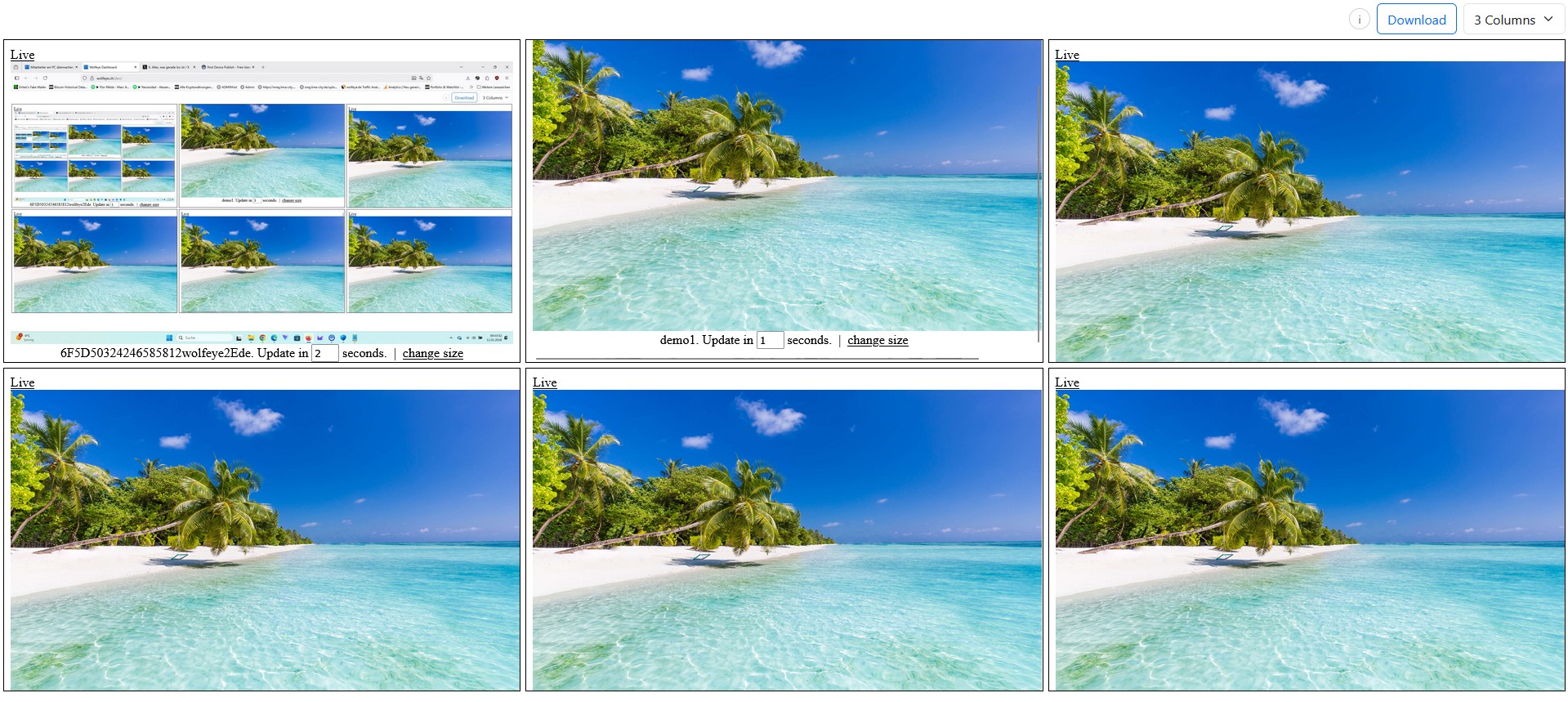
Illustrative grid view with multiple company-controlled PCs. In a pilot, the multi-screen dashboard works best as a radar: which devices are stable, where is someone visibly stuck, and which structure remains readable? Use only where lawful for the relevant country and use case.
4. Do not jump straight to 10 PCs: validate on 1–2 reference devices first
Even if the real goal is a 5–10 PC pilot, the very first technical validation should happen on one or two reference devices. These devices are not the pilot itself. They are the clean path through installation, browser access and first live visibility.
This step is worth more than it seems. Once the installation path is understood, the first viewer test works and the dashboard shows the expected screens reliably, the probability of a calm and structured pilot rises sharply.
On these first reference devices, verify at least the following:
- Is the installation path internally clear and repeatable?
- Are there Windows prompts or antivirus interactions that matter for later devices?
- Does the dashboard connection behave as expected?
- Who tests viewer access, and with which role?
- Are device names already structured so that the future grid remains readable?
It is also important to manage expectations. The first successful live screen is not “the rollout is done”. It is simply the point at which the real pilot can start under controlled conditions.
For MSPs, this step is especially valuable because it can become a reusable mini-runbook: install the first device, validate access, confirm naming, verify the grid, document responsibilities. Once that works cleanly on one or two devices, expanding to five or ten is usually far smoother.

Illustrative large single-screen view of a company-controlled PC. In a pilot, this perspective should be reserved mainly for concrete cases such as training, QA, support or incident clarification rather than becoming an undefined default view. Again, use only where lawful after proper legal review.
5. From 2 devices to 5–10: how a technical test becomes a real pilot
Once 1–2 reference devices are working cleanly, the next step is to expand deliberately to 5–10 company PCs. This is the point where the project stops being a technical proof and becomes an operational pilot. Now the question is no longer only whether live screens can be seen. The question becomes whether the dashboard remains understandable and whether the use case actually works in daily operations.
The most useful operating principle here is simple: grid first, large single-screen view only when needed. The grid is the radar. It helps viewers spot where a workflow is visibly stuck, where support is needed, or where a supervisor or IT lead should look more closely. Only then should someone switch into a large single-screen view.
For many teams, a practical pilot routine looks like this:
- a short morning grid check on the selected pilot PCs,
- a targeted switch to large-screen view only when a concrete situation appears,
- no “leave it open all day” habit, but short purpose-driven checks,
- optional history only where there is a defined reason and the use is legally cleared.
This helps avoid one of the most common rollout mistakes: a dashboard that technically works but operationally turns into a vague “just keep it open” project. A good pilot is not maximum visibility. It is disciplined visibility.
This is also the phase where naming logic proves its value. Once you reach 5 to 10 devices, you quickly see whether the dashboard remains easy to scan or whether mixed Windows names, unclear abbreviations and improvised labels are already making the grid harder to use than it should be.
6. The first pilot week: what you should really be watching for
During the first week, the goal is not to maximise live viewing time. The real goal is to learn whether the pilot remains calm and understandable under normal daily conditions. That is why you should not only watch for technical issues, but also for operational friction.
Useful pilot-week questions include:
- Does the dashboard stay understandable for the intended viewers?
- Are the right people using it, or too many?
- Does live visibility create faster clarification in real situations?
- Are grid view and single-screen detail being used appropriately?
- Does the pilot remain inside its original scope?
The last point matters a great deal. Many pilots do not fail because of technology. They fail because of scope drift. As soon as the first devices work, extra requests arrive: one more team, one more location, one more client, one more viewer. A clean pilot needs discipline right here. Only once the first 5–10 PCs are stable and useful should expansion even be discussed.
It also helps to keep a very short pilot note. Not a big report, just a concise internal record of:
- which PCs belong to the pilot,
- who the viewers are,
- which daily situations created real value,
- where friction appeared,
- which changes would be needed before a wider rollout.
For MSPs, that small record is often the seed of a repeatable client-side rollout playbook.
7. Troubleshooting without rollout chaos: the most common stumbling blocks
A pilot does not need to be perfect. But it should be calm enough that small problems do not immediately feel like a fundamental issue. That is why it helps to anticipate the most common stumbling blocks before the pilot becomes emotionally “too important”.
Typical examples include:
- Unclear ownership: nobody is clearly responsible for install, viewer validation or follow-up adjustments.
- Weak naming logic: devices show up in the grid with inconsistent or confusing labels.
- Too many viewers: the pilot loses focus very early.
- Wrong viewing expectations: instead of short purpose-driven checks, the dashboard becomes something people leave open by habit.
- Scope expansion during the pilot itself: extra teams or devices are added before the first 5–10 have even settled.
A good pilot should therefore accomplish two things at once: it should create live visibility, and it should train organisational discipline. If only the first part works, the larger rollout often becomes unstable later.
A practical rule helps here: every expansion in the pilot must have a nameable reason. If nobody can explain why a new device or viewer belongs in the next step, it probably does not belong there yet.
8. Go / No-Go: when you should roll out further — and when you should not
The most common post-pilot mistake is not moving too slowly. It is assuming that a technically successful pilot automatically justifies a wider rollout. A pilot is only successful if it gives you an honest basis for decision-making.
Strong “go” signals include:
- the defined use case creates clear daily value,
- viewer roles are clear and remain disciplined,
- the dashboard is readable and useful with 5–10 PCs,
- the pilot feels operationally calm and understandable,
- the next devices or teams can be added through a logical extension of the pilot.
A “not yet” or “refine first” outcome is often the better choice if:
- the purpose is still too vague,
- too many people want access too early,
- dashboard structure and naming are already getting messy in the small setup,
- the pilot is not producing clear operational value,
- technical or organisational questions are still being answered through improvisation.
A good pilot does not always have to lead to a big rollout. In some cases, the best outcome is to stay deliberately small or stabilise one narrow use case first. That is not hesitation. That is operational maturity.
9. For MSPs in particular: turn the pilot into a repeatable service component
For IT service providers and MSPs, this topic matters even more because a good pilot is rarely just a one-off technical exercise. It can become the foundation of a repeatable managed-service component.
If you start cleanly with 5–10 company PCs, document scope, viewer roles, naming logic, viewer routine and go/no-go criteria, you create a strong operational standard. The next client rollout no longer starts from zero.
That makes it possible to package a simple and credible service flow:
- Pilot definition: which devices and which use case belong in scope?
- Technical start: reference devices, viewer validation, dashboard access.
- Pilot week: grid routine, large-screen view only when needed, concise client feedback.
- Decision: expand, refine or keep the deployment intentionally narrow.
This is often much easier for clients to understand than a vague “monitoring rollout”. A small controlled pilot creates trust because the operational value becomes visible quickly.
Frequently asked questions – safe pilot start with employee screen monitoring
Because that often makes scope, naming, roles and dashboard usage unclear too early. A 5–10 PC pilot is large enough for real daily tests and small enough to remain controlled.
It is enough for the first technical validation. It is usually not enough for an operational pilot. Only several devices show whether naming, grid use and viewer habits actually work in practice.
As few as possible. In many SMBs, the owner, one team lead or supervisor and possibly one IT responsible person are enough. In MSP environments, visibility should also be cleanly separated by client context.
No. This article is explicitly not legal advice. Lawfulness depends on country, use case, contracts, internal policy and often on whether users must be informed or consent is required. Always obtain independent legal advice before deployment.
Conclusion
The core idea of this article is simple: a good start with employee screen monitoring does not begin with maximum reach. It begins with a small, clean pilot on selected company-controlled Windows PCs.
Once scope, purpose, viewer roles, naming logic and pilot routine are clear, live visibility becomes genuinely useful without turning into rollout chaos. That is the difference between a noisy introduction and a setup that actually works in day-to-day operations.
For SMBs, that means starting in a controlled way, observing meaningfully and deciding clearly. For MSPs, it means turning the first pilot into a repeatable service model. Always provided that the deployment is lawful in the relevant country and use case and has been reviewed properly in advance.
Want to see how this kind of pilot could look on your own company PCs?
Start 14-day free trialThis article is technical and organisational information only and does not constitute legal advice. Monitoring software may only be used where this is lawful under the applicable laws, contracts and internal policies in the relevant country and for the specific use case. Whether users must be informed or consent is required depends on the country and scenario. Always obtain qualified independent legal advice before deployment. This article refers exclusively to company-controlled Windows PCs.