DE EN ES
wolfeye.co
Pricing Book Live Demo

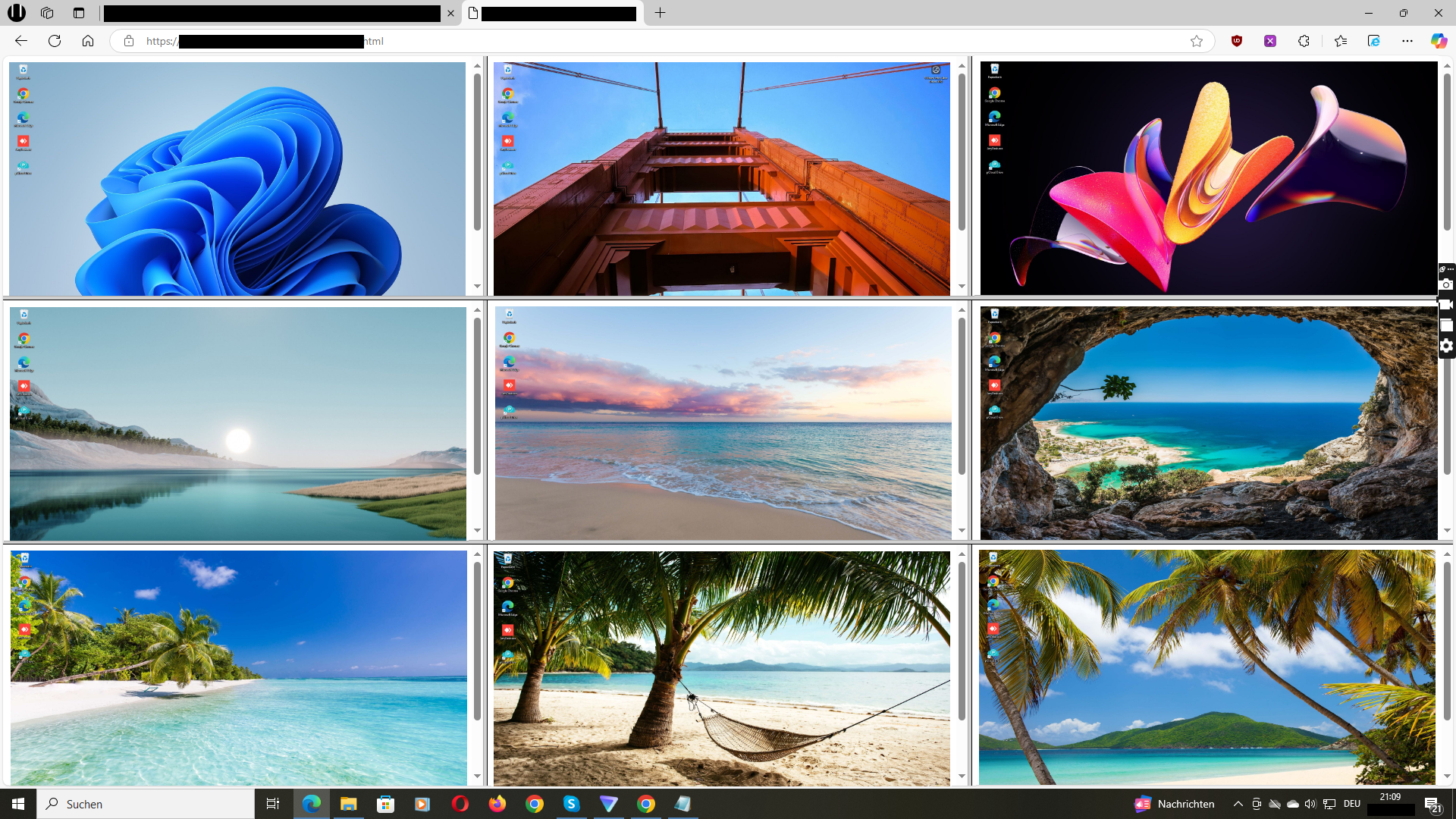
Call Center Screen Wall: Watch 10–200 agent screens live from one dashboard

Wolfeye is live screen monitoring (screenshot-based) for call centers & BPOs. Supervisors instantly see what is on agent PCs – ideal for QA, coaching, compliance, and fraud prevention.

Wolfeye Call Center Screen Wall – live grid view
Example: grid/screen wall view (call center supervision)

Why call centers use Wolfeye

One dashboard = all agent screens live

Use the grid/screen wall as a “radar”: instantly spot script deviations, stuck agents, or suspicious patterns – without starting remote desktop.

5-minute setup (3 steps)

Install, activate, view live. No VPN required. Works for home office agents too.

Predictable & lightweight (not video)

Wolfeye is screenshot-based (about every 3 seconds), not continuous video streaming. That makes bandwidth and performance planning easier.


Book Live Demo

Typical call center use cases

  • Quality Assurance: Check script adherence and process steps live.
  • Coaching: Train new agents faster (without interrupting them).
  • Compliance: Make sensitive workflows visible (payments/CRM steps).
  • Fraud & insider risk: Detect suspicious behavior earlier and investigate faster.
  • Hybrid: Office + remote agents in the same dashboard.
Book Live Demo
Wolfeye Dashboard Grid View for Call Centers

3-step technical setup – from download to first live screen

Install: On each Windows PC, add an antivirus exception (for C:\Users\Public\Documents) and run the installer.

Activate: On the PC in the Wolfeye Control Window: Share ScreenEmail URL (optional Stealth Mode).

View live: Open the link from the email in your browser. Repeat for additional PCs – then everything appears in the dashboard.

Full walkthrough: Quickstart

Book Live Demo

Bandwidth & performance (sizing guide)

Wolfeye is screenshot-based (about every 3 seconds), not video streaming. This is typically lighter than 10–30 FPS streaming tools.

Rule of thumb: If a live screenshot is ~400 KB and updates every 3 seconds, that is about ~1.1 Mbps upload per PC (continuous). Real values vary—confirm with a pilot.

Best practice: use grid as radar, zoom only when investigating, start with a 3–5 PC pilot, then scale.

Read more: Bandwidth & Performance Guide

Book Live Demo
Wolfeye live screen monitoring example
Book Live Demo →

Video: Wolfeye Call Center Screen Wall (Live Demo)

See how supervisors watch multiple agent screens live in a grid and zoom in when needed—without starting remote desktop.

Video: Call Center Screen Wall (Wolfeye Demo)

FAQ (Call Center)

Is Wolfeye a video stream?

No. Wolfeye is screenshot-based (about every 3 seconds in Live Mode) and typically far lighter than continuous video streaming tools.

How much bandwidth is that per PC?

If a screenshot is ~400 KB and updates every 3 seconds, that is roughly ~1.1 Mbps per PC (continuous). Screenshot size varies—confirm with a pilot. Sizing guide.

Will it slow down PCs?

No.

Does it work for remote / home office agents?

Yes. Live view works over the internet—VPN is not strictly required.

How fast is the setup?

Often minutes: run installer, click Share Screen + Email URL, open the link in the browser. Quickstart.

Do users need to be informed?

Often yes, but it depends on country, contracts, policies and purpose. We do not provide legal advice. Check local laws and implement internal policies. Legal & Privacy.

More technical guides in the blog →

Book Live Demo →
Wolfeye is monitoring software. Use is subject to local laws, contracts and internal policies. We do not provide legal advice. Please consult qualified legal counsel to ensure compliance in your jurisdiction.
Chat with me on WhatsApp